
Current task
ReStory: Chill Electronics Repairs first shift
Evidence-backed player reference for ReStory: Chill Electronics Repairs covering first shift, with version, source and media boundaries kept visible.
Begin with the request channel, name the device, and follow the four published repair stages before returning to the customer and shop systems. The route is a practical reading order for a first job, with no invented profit target or hidden ending condition. Patento BS and the captured workbench images show how identification carries from intake into the physical repair.

Current task
Start the first repair shift and understand the intake loop.
Start the first repair shift and understand the intake loop.
Working view: full-release-1.0.009r · captured
A first shift in ReStory begins at the counter, not at a character-creation screen. The official store and demo announcements describe a small electronics repair business that receives requests in person and online, then turns those requests into repair jobs. This route gives a practical order for reading the shop: identify the request, understand what the customer expects, work through the device, and return to the shop systems before accepting another job.
The sequence below stays close to the captured material. It does not assume a hidden tutorial script, a required profit target, or a specific ending. Use the checklist to make a personal first-shift note while the illustrated examples show how the request channel, device, and workbench connect.
1. Read the request channel first
The game supports in-person orders and online orders, so the first useful question is where the request arrived and what the customer is asking to have restored. An in-person order puts the shop counter and the conversation in the foreground. An online order makes the same business legible through the game’s in-shop web activity. In both cases, the request is the start of a relationship: the object belongs to a person with an expectation, not just to a row in an inventory.
Do not treat the channel as a decoration. It helps separate the social side of the shop from the practical side of a repair. Read the request before jumping to the parts browser, note the device category, and keep the customer’s story in mind when you later make a choice. The available sources establish these channels but do not publish a complete list of every request variant, so a careful first shift leaves room for the game to surprise you.
A useful first note records whether the request arrived in person or online, which device name was used, and what the customer asked to have restored. Those three details preserve the social and technical sides of the job while leaving unsupported request variants open for play. It also gives the next bench action a clear reason instead of treating the intake screen as a generic menu.
2. Make the device legible before opening it
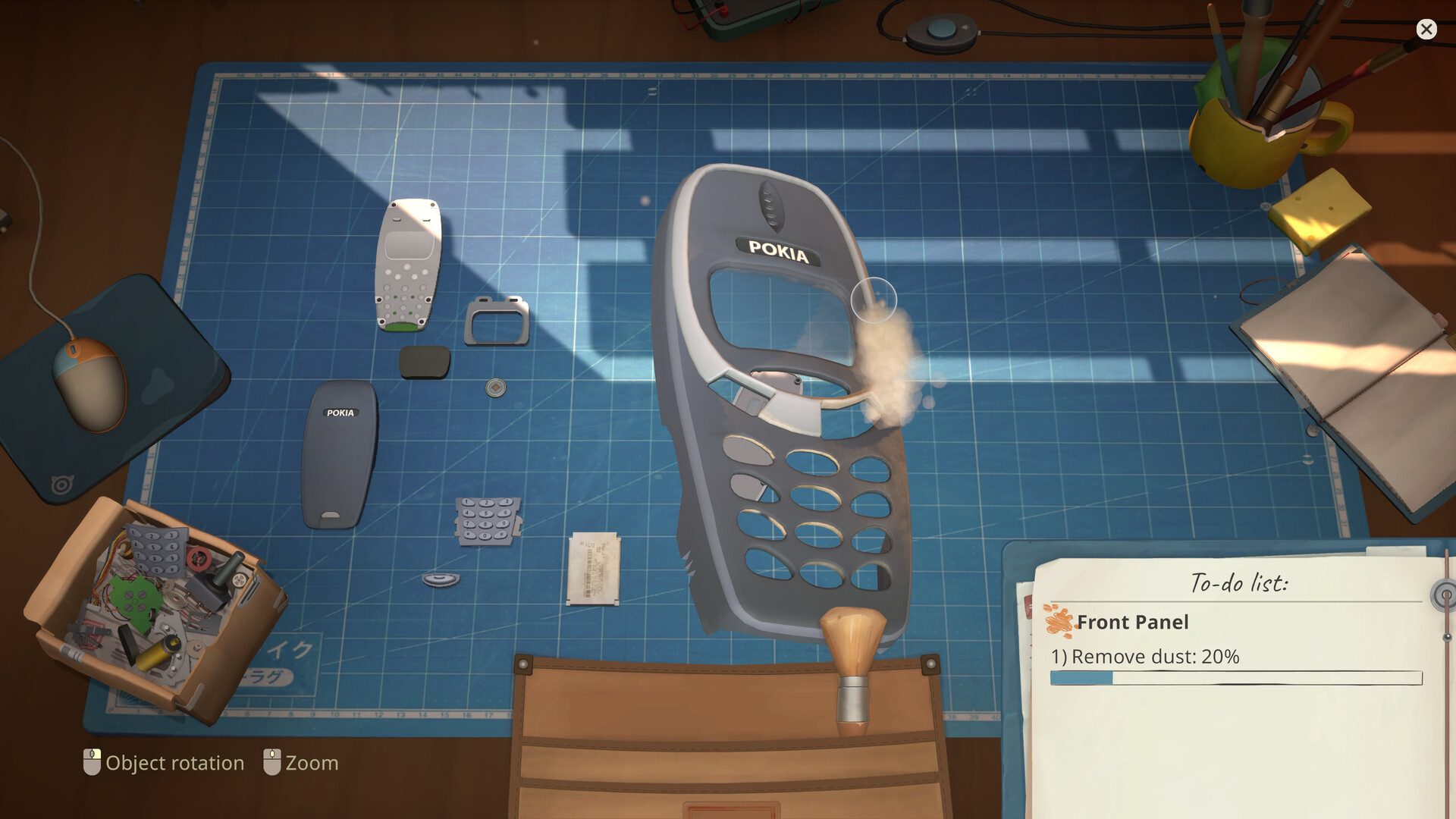
The official screenshots show a workbench with an opened device, a cutting mat, small parts, and tools. That visual is a useful reminder that intake and repair are connected but distinct. First identify the device and the condition implied by the request. The named catalog includes consoles, handhelds, phones, cameras, music players, and home appliances, so the right mental preparation depends on what has arrived on the counter.
Patento BS is a good example of why identification matters. It is a named record, not merely an invented label for a generic handheld. The official image set shows it opened on the bench and also shows the object with stickers, giving the player a before-and-after sense of the same work order. Keep the device name stable as you move between the customer route, the device record, and the repair stages.
The intake pass also gives the player a clean handoff between the customer route and the device catalog. Compare the named record with the workbench image, then carry the same spelling into the parts browser and checklist so the work order remains one continuous object.
3. Work through the four repair stages
The published repair loop has four concrete stages: disassembly, cleaning, replacing faulty parts, and assembly. Disassembly exposes the device without losing track of how it fits together. Cleaning removes the dirt that blocks a reliable inspection. Faulty-part replacement addresses the broken component rather than only making the outside look better. Assembly closes the job and turns a collection of parts back into a device that can be handed over.
The order is important for a new player because it follows the physical logic of the object. The screenshots show brushes, an opened casing, circuit boards, and replacement components as separate visual cues. Read the bench page for the detailed version of each stage, but keep this short sequence beside the first-shift checklist. It is a reliable framework drawn from the official description even when the exact minigame actions vary by device.
The four labels are a sequence, not four interchangeable activities. Finish the opening work before cleaning, use the cleaned view to guide the replacement decision, and assemble only after the faulty part has been addressed. That order is the clearest practical summary supported by the published repair description.
4. Return to the shop between repairs
A repair is one part of the shop-management loop. The game also describes customer intake, finances, shop growth, and room customization. After a handoff, look at the business state before immediately starting another technical task. The landlord relationship, the room, incoming orders, and the tools available in the shop all belong to the same working day in the published premise.
Customization is not limited to a single cosmetic slider. The sources mention an airbrush, a color palette, and room decor, while the official screenshots show a device being painted and the shop interior changing around CRT equipment. Keep appearance work separate from fault repair in your notes: it can be part of the shop’s identity and progression, but the four-stage repair loop is the clearest technical backbone for a first shift.
The return step is where a technical result meets the wider business. A completed device, a new request, a room change, and the landlord relationship can all occupy the same shop rhythm. Record them separately so a cosmetic choice is not mistaken for a repair requirement.
5. Treat handoff as part of the job
The customer story does not stop when the device looks clean. The request, the chosen repair path, and the relationship around the device all frame the handoff. If a conversation presents a choice, read it as a shop decision with a person attached. The store description explicitly points to branching choices and multiple endings, while the captured character records show that customers have distinct routines and interests.
For a calm first playthrough, finish one request with attention to its language rather than trying to optimize every possible branch. Keep a note of the device name, the request channel, the stages completed, and any customer choice you made. That four-line record is enough to connect the next job to the broader routes here without claiming that a single shift reveals the game’s full story.
A handoff note can stay concise: device name, request channel, stages completed, and conversation choice. It gives the next shift useful context without claiming that one customer response always produces one fixed branch. The captured sources support the choice system, not a universal outcome table.
First-shift checklist
Use these five concrete notes while you play. They are reminders of the published shop loop, not a hidden score requirement.
Mark the request channel, name the device before opening it, complete disassembly and cleaning, source the faulty part through the browser, and assemble the device before handoff. The checklist follows the captured sequence and gives you a compact record for the next customer conversation. It does not promise that every device uses identical actions or that one completed list unlocks a particular achievement. Add the customer choice and the version view to the same note when they matter, so a later comparison keeps the social decision, repair state, and dated build in one place for this captured full-release view.